
Enterprise Storage
Datrium DVX Data Recovery: When an Array Becomes Inaccessible
Healthy drives do not always mean accessible virtual machines. Understand Datrium DVX storage, unsupported-array recovery, and lessons from a documented 93-VM case.
By WeRecoverData ·
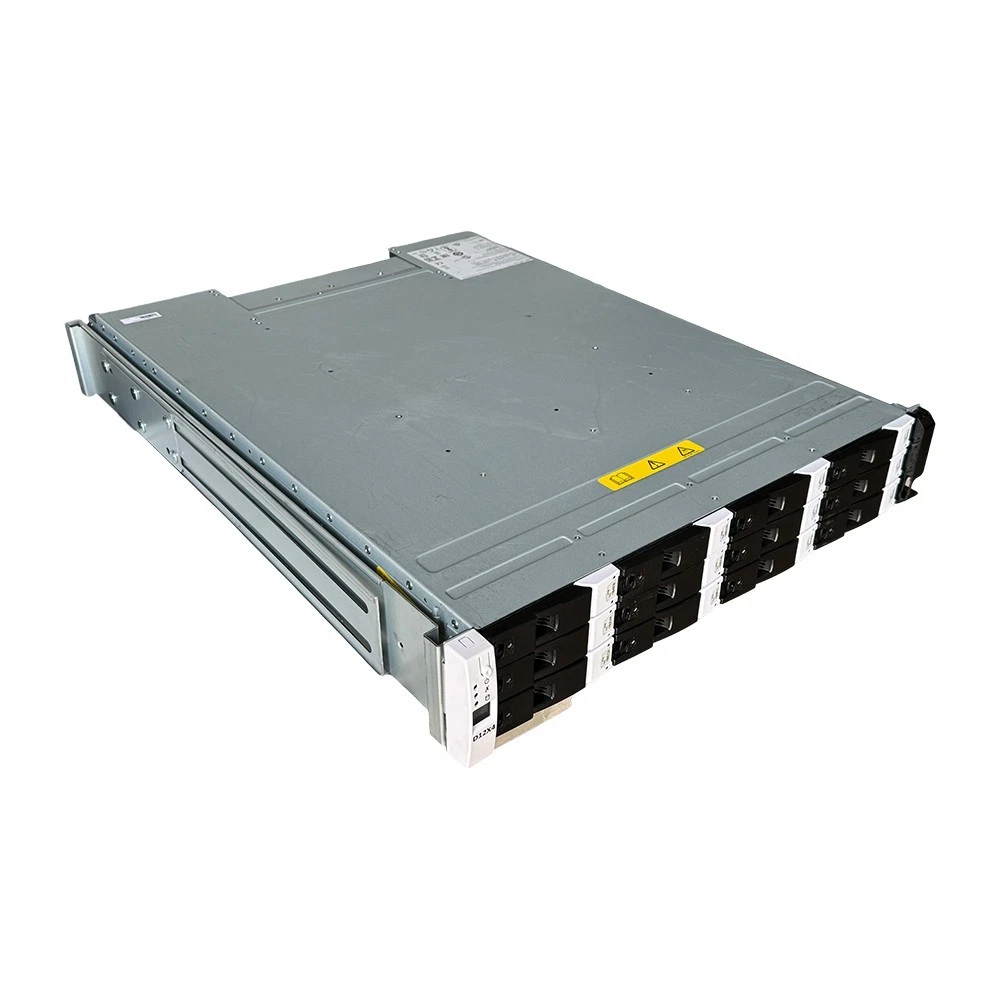
Can an inaccessible Datrium DVX array be recovered? A documented WeRecoverData project recovered critical VMware systems from one unsupported array using a read-only process. Recoverability depends on the source condition and metadata; the case is evidence of that project, not a guarantee for another system.
What is a Datrium DVX array?
Datrium DVX separates the performance tier on virtualization hosts from persistent storage on Data Nodes. Compute Nodes use host-local flash, while Data Nodes hold the durable copy of the clusterâs data. This distinction matters when an array becomes inaccessible: recovering a virtual machine involves understanding the storage layout and its metadata, not simply finding one readable drive.
DVX uses a proprietary layout with log-structured storage, deduplication and compression metadata. WeRecoverDataâs Datrium DVX data recovery service describes the Data Node, Compute Node and metadata components evaluated during recovery. Historical independent research also describes DVX as separating active data from durable capacity, with compute and capacity expanded independently. [1]
Why can data become inaccessible even when drives are healthy?
Physical drive health and access to a virtualized storage environment are different questions. The drives may still be readable while the management environment, metadata or supported access path is unavailable.
In our documented Datrium DVX case, the array was still powered on and its drives reported healthy. However, the hardware was degraded, warnings were active, and the management environment was missing. The client also lacked the licences and vendor support normally used to access the data. The result was 93 virtual machines that could not be reached through a supported method.
Other situations evaluated by our Datrium service include Data Node drive failures, node or controller failures, metadata corruption, accidental VM or datastore deletion, failed upgrades or decommissioning, and power-related incidents. These are distinct problems; the recovery approach must follow the condition of the actual system.
Backup restore and Datrium DVX data recovery are not the same
A backup restore uses an available protected copy. Array data recovery addresses data that cannot be reached through the normal storage environment. Establishing whether an independent, usable backup exists is therefore an important first question.
Historical DVX documentation describes local protection, secondary-site replication and Cloud DVX options for protected copies. That documentation explains the platformâs intended data-protection capabilities; it does not establish whether a particular organization configured them or can access them today. [1]
For the client in our case study, there was no supported way to extract the stranded virtual machines from the original system. Our engineers built a purpose-specific recovery environment and transfer process, rather than treating the incident as a routine restore.
What to do before attempting recovery
The original array may be the only remaining source of critical data. Before making changes, document its current state and ask for a recovery assessment. The non-destructive approach in our case study offers a useful preservation principle: read the source without changing it, and verify recovered data separately.
- Record the condition. Note active warnings, inaccessible systems and what changed before access was lost.
- Identify the environment. Gather the DVX deployment details, available management access and the locations of Data Nodes, Compute Nodes and any protected copies.
- Set business priorities. List the virtual machines and applications the organization needs first.
- Discuss changes before proceeding. Do not assume that a repair, reconfiguration or generic recovery tool is appropriate for the proprietary storage layout.
- Plan verification and delivery. Agree how recovered virtual disks will be checked and where the recovered data will be stored.
In the documented project, the source was read only and recovered virtual machines were not started during extraction. That was the approach used for that system, not a universal instruction to power every damaged array on or off.
A real Datrium DVX recovery: 93 virtual machines on an unsupported array
A corporate client had 93 virtual machines on an end-of-life Datrium DVX array, representing about 126 TB of provisioned capacity and about 86 TB of real data. With no supported access method and degraded hardware, the engineering team prioritized the clientâs four most critical systems.
Those four systems, about 15 TB in total, were recovered and verified in eight days. Checks against the source found zero discrepancies. More than 70 of the 93 virtual machines had been recovered at the time of writing, with the remainder still in progress.
These are results from one project, not a promised turnaround or a guarantee that every DVX array is recoverable. Client details remain confidential, and the figures describe progress at the time of the report.
Read the complete Datrium DVX data recovery case study for the source condition, read-only method, changing priority lists, project timeline and verified delivery.
What does recovered Datrium DVX data look like?
In the case study, recovered systems were delivered as standard VMware virtual disk files on dedicated storage. This separated the recovered data from the unsupported array and gave the client files usable in a VMware environment.
The service evaluates virtual machine disks and file-level data within the DVX layout. What can be extracted depends on the condition of the source and its metadata. A readable drive alone does not establish that every VM, disk or file is complete.
Verification matters as much as extraction. In the documented recovery, each recovered system was checked against the source before being marked complete. The case study distinguishes recovered and verified systems from work that remained in progress.
Common questions about Datrium DVX recovery
Can data be recovered without vendor support?
Our documented case demonstrates recovery from one unsupported Datrium DVX array using a purpose-built, read-only process. It does not establish the outcome for another array; that requires a comprehensive evaluation.
Can standard RAID recovery software read a DVX array?
DVX data is distributed across nodes in a proprietary layout. Our Datrium service explains that standard tools cannot read that layout directly. Understanding the data and metadata structure is part of the recovery work.
Does the case study mean all 93 VMs were recovered?
No. More than 70 had been recovered at the time of writing, and the remainder was still in progress. The four critical systems were recovered and verified in eight days. These are separate milestones.
How long does Datrium DVX data recovery take?
The published timeline belongs to that individual project. The source condition, data volume, access limitations and priority systems must be evaluated before estimating another recovery.
Discuss an inaccessible Datrium DVX array
If virtual machines remain stranded on a DVX array, the next step is to evaluate the original system and identify what data the business needs most urgently. WeRecoverDataâs Datrium DVX recovery service covers in-lab, onsite and remote recovery options, selected according to the environment and source condition.
Start a case for a comprehensive evaluation, or review the documented Datrium DVX recovery before discussing your array.
Sources and scope
- WeRecoverData: Datrium DVX recovery case study â source for the client scenario, recovery method, milestones and verification results.
- WeRecoverData: Datrium DVX data recovery service â source for the platform components and recovery situations described here.
- [1] Evaluator Group: Efficient Hybrid-Cloud Data Protection using Datrium Cloud DVX â historical platform research from 2018, now hosted by Futurum Group; not a statement about current product availability or support.
This article explains the platform and a documented recovery. It does not identify the client, promise recovery outcomes or replace an assessment of the affected array.